iPhone and iPad app · Coming soon
Deploy, roll back and fix your apps from your iPhone.
The Railyard app puts every app and server you run on Railyard in your pocket: live traffic, deploys, logs, server load, daily reliability scores and alerts you can act on. It uses your existing Railyard account and talks to the servers you already deploy to.
Coming soon to the App Store. We run it on our own production apps every day.
Only on Railyard
Things no other hosting app does.
Shake to roll back
Shake your iPhone on a broken app and Railyard offers to roll it back to the release before. Confirm with Face ID and it's done.
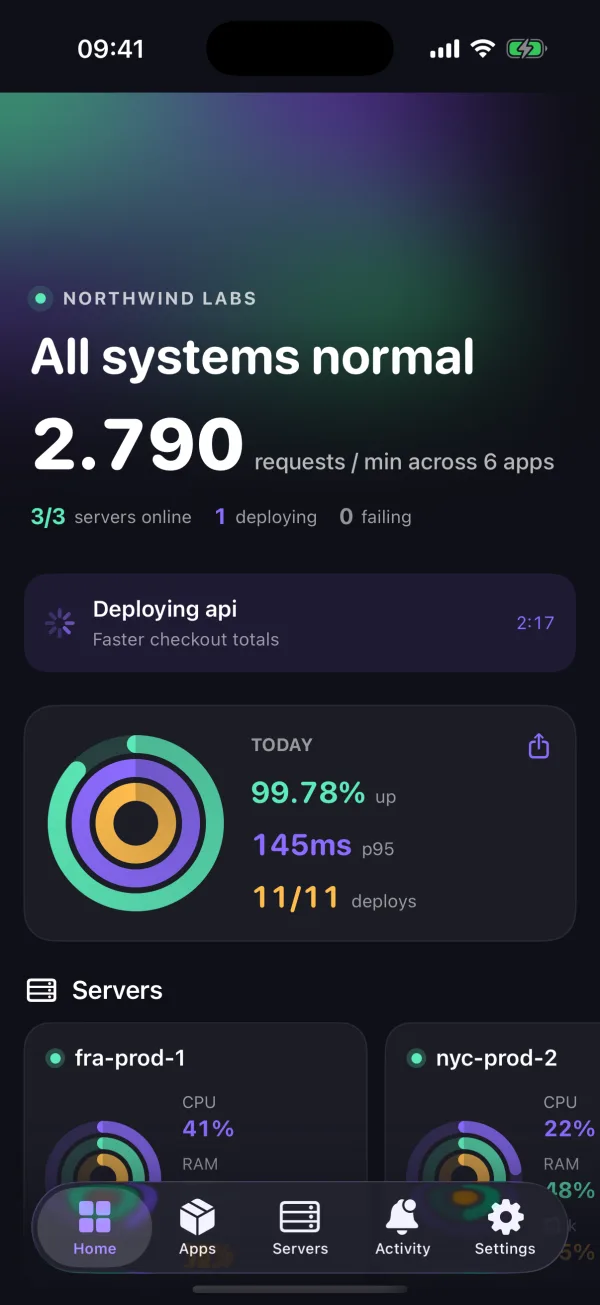
Reliability rings
Uptime, speed and successful deploys, scored every day as three rings. Close all three, then share the card with your team or your customers.
Approvals signed by your Face ID
When an AI agent asks to delete, restore or reboot something, you approve with Face ID. A key in your iPhone's Secure Enclave signs the approval and Railyard checks the signature before anything runs.
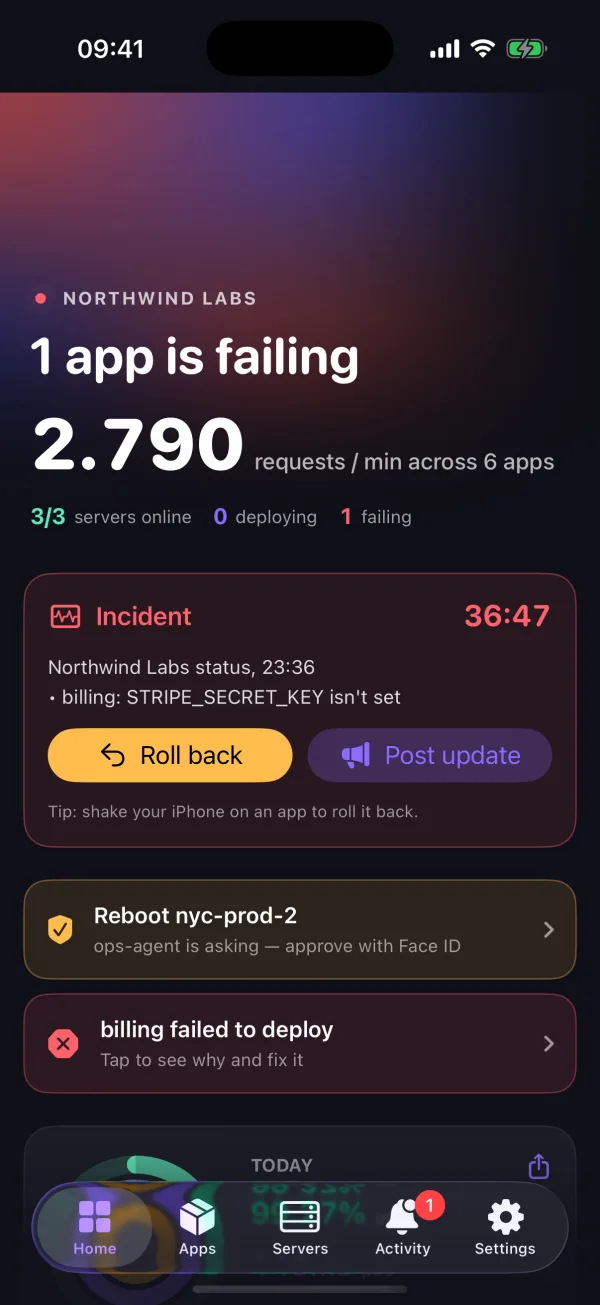
Incident mode
When something breaks, Home turns into an incident view: a running timer, the cause, one-tap rollback and a status update ready to paste into Slack.
Siri and Shortcuts
Ask "How is production in Railyard?" or say "Roll back storefront in Railyard". Your phone must be unlocked and asks you to confirm first.
Deploys on your Lock Screen
A Live Activity follows your deploy on the Lock Screen and in the Dynamic Island, from queued to live, with a running timer.
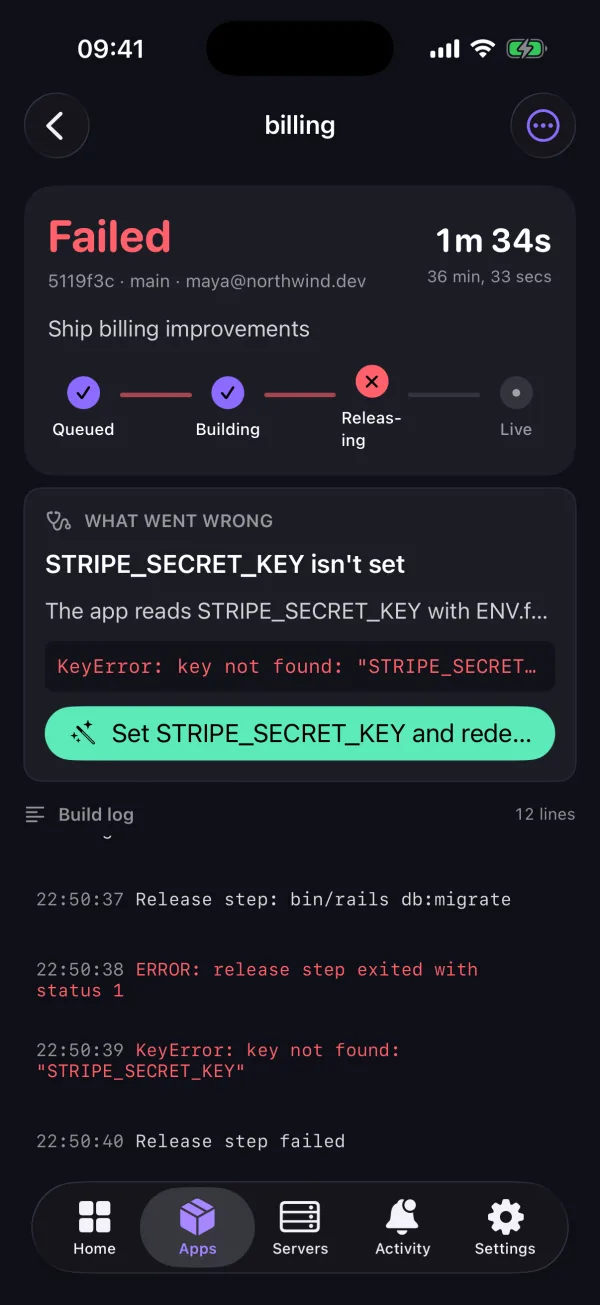
When a deploy fails
See what broke and fix it from the same screen.
Railyard reads the build and release output and names the cause: a missing variable, a failed migration, a build error, a full disk. When the fix is a variable, you type the value and Railyard redeploys.
- Build log that follows the deploy line by line
- Queued, building, releasing, live, with a running timer
- Roll back to the last good release in one tap
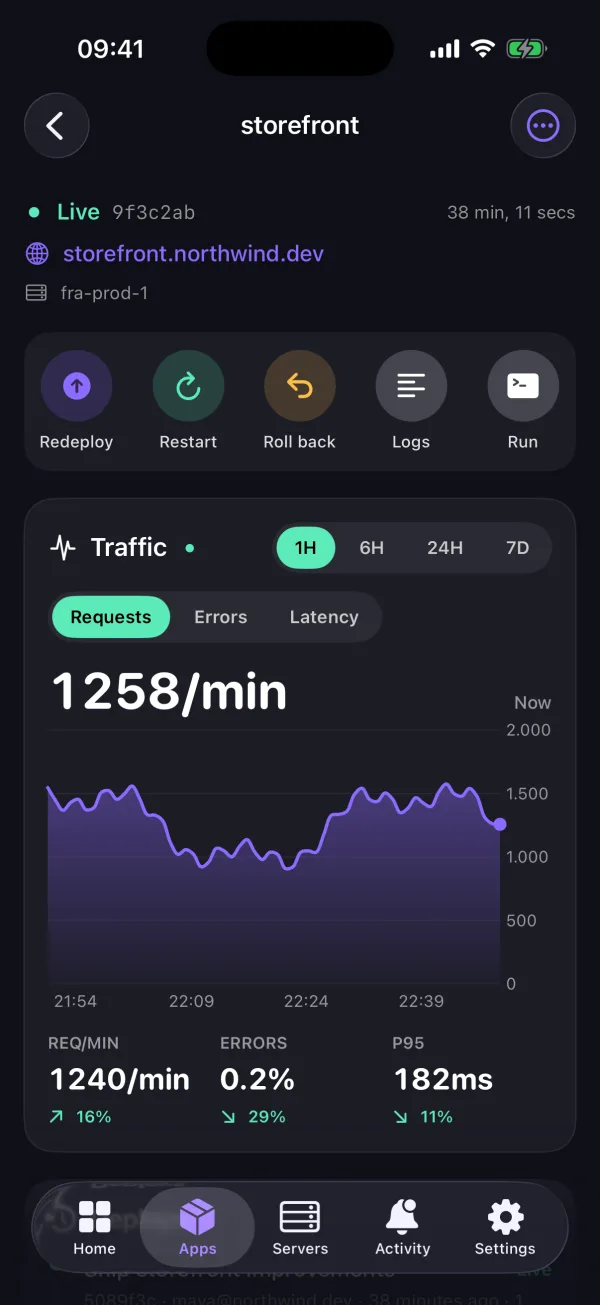
Live traffic
Requests, errors and latency for every app.
Charts update on their own. Drag across a chart to read any minute. Compare the last hour with the hour before, and see the slowest endpoints at a glance.
- Requests per minute, error rate and p95 latency
- 1 hour to 7 day ranges
- Processes with CPU, memory and restarts, plus worker scaling
Approvals
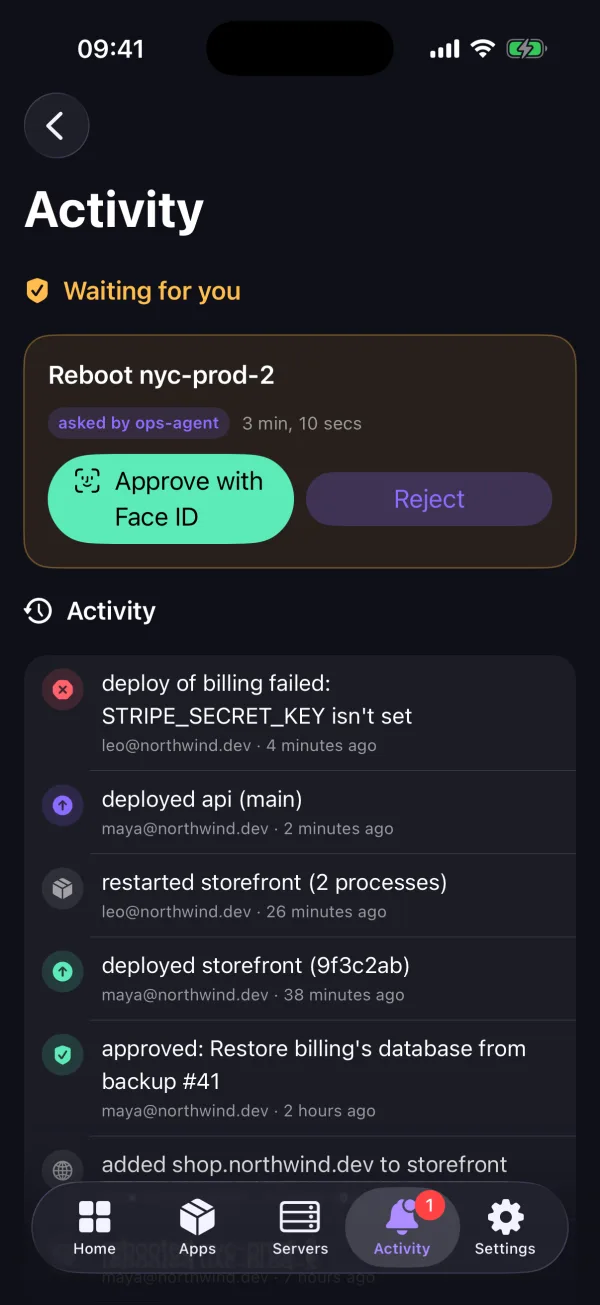
Approve risky changes with Face ID.
When an AI agent or a teammate asks to delete an app, restore a backup or reboot a server, the request waits for a person. You approve it on your phone with Face ID. The token that asked can never approve its own request.
- Signed by a key that never leaves your iPhone
- Reject with one tap
- Every decision lands in the team's activity log
Servers
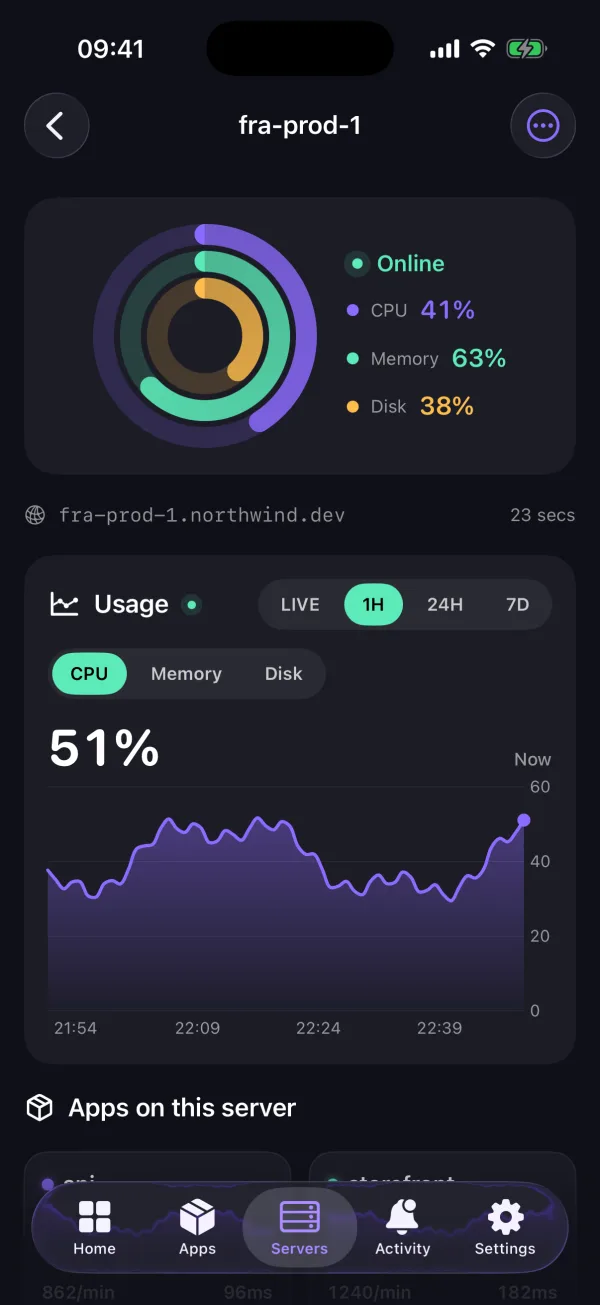
Your servers at a glance.
Every server shows CPU, memory and disk as rings, with live and historical charts behind them. Reboot a server or open the apps it runs from the same screen.
- Live, 1 hour, 24 hour and 7 day charts
- Online, stale and offline states
- Works with DigitalOcean, Vultr, Hetzner and servers you attach yourself
Everything in the app
The parts of Railyard you need away from your desk.
- Deploy, redeploy and roll back
- Restart apps and scale workers
- Live container logs with filters and saved searches
- Run one-off commands such as migrations
- View, add and remove environment variables
- Run scheduled tasks now
- Database backups: back up now and restore
- Launch templates like WordPress, n8n and Plausible
- Team activity feed
- Alerts with Roll back and Acknowledge buttons
- Home Screen and Lock Screen widgets
- Spotlight search and Home Screen quick actions
- Handoff to the web dashboard on your Mac
- Several teams, and your own Railyard install
- iPad layout with keyboard shortcuts
- English, French and Spanish
Security
Built so a lost phone can't hurt your servers.
- You sign in on Railyard's own page with your password, two-factor code or SSO. The app never sees your password.
- Your token stays in the iOS Keychain on this device only, and signing out revokes it.
- Restarts, rollbacks, reboots, restores, variables and commands ask for Face ID, Touch ID or your passcode first.
- Alerts reach your phone through Apple with no log lines in them. The app fetches the details from your Railyard install itself.
- The app only shows the apps your role can see.
iPad
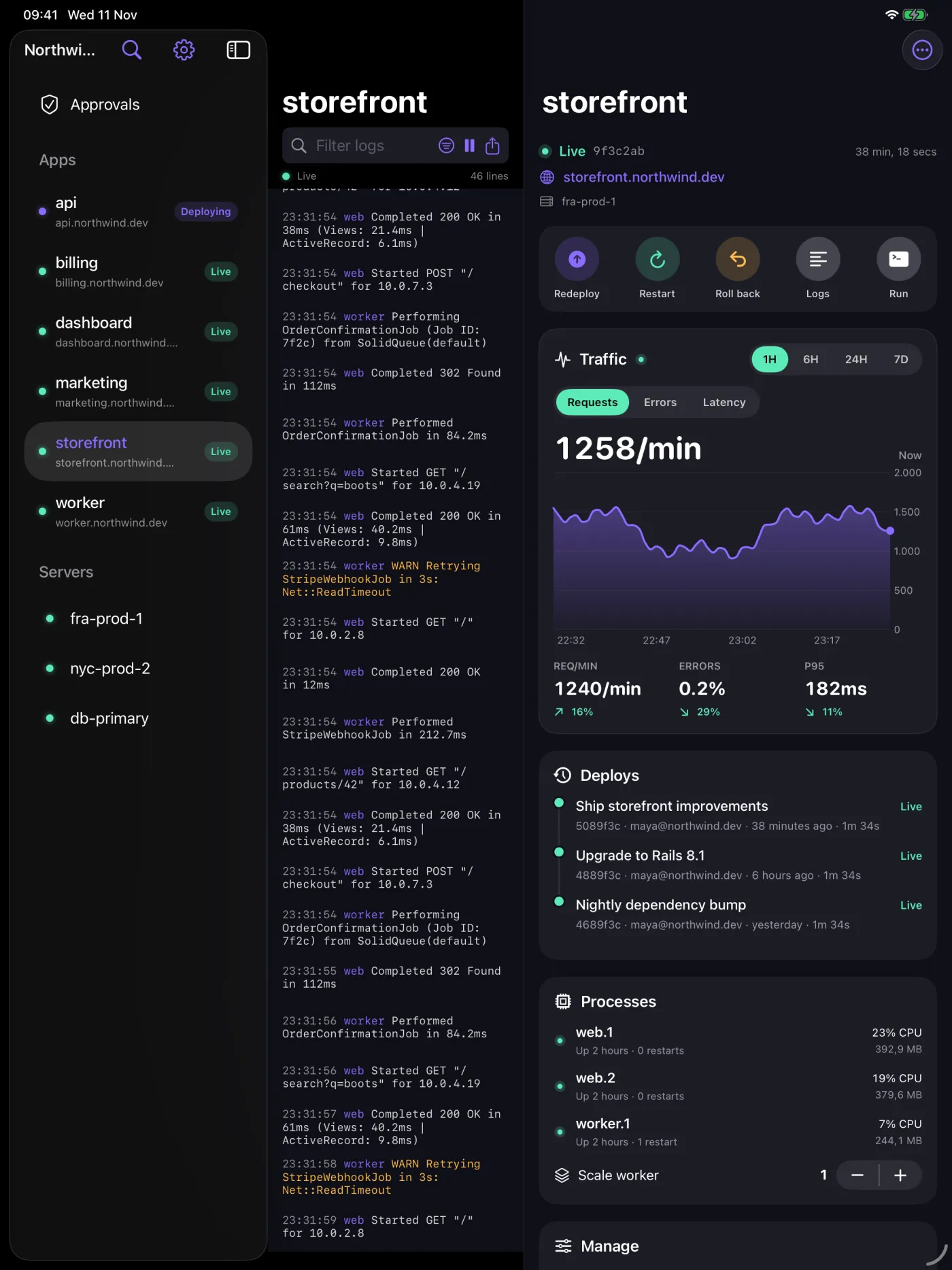
A command center on iPad.
On iPad the app opens in three columns: apps and servers on the left, live logs in the middle, the app's traffic, deploys and processes on the right. Press ⌘K to search everything, ⌘R to restart the app you're looking at, and ⌘L for its logs.
Why teams pay for Railyard
Production on servers you own, with the safety net of a platform.
Your servers, one flat price
Apps run on your own DigitalOcean, Vultr or Hetzner servers. You pay the provider for the machine and Railyard one flat price per team.
Fewer hours lost to incidents
Alerts with buttons, a diagnosis for failed deploys and one-tap rollback. You fix the problem from wherever you are when it happens.
Safe automation
AI agents and teammates can do real work through Railyard, and anything that deletes or overwrites data waits for a person to approve it.
The whole stack in one place
Apps, Postgres, Redis, backups, domains, logs and metrics, on the web, the CLI, the API and now your phone.
Questions
What, who, why and when.
What is the Railyard app?
A native iPhone and iPad app for Railyard. It shows your apps, deploys, logs and servers live, and lets you deploy, roll back, restart, run commands, manage variables, run backups and approve changes from your phone.
Who is it for?
Anyone who runs production apps on Railyard: founders on call for their own product, agencies looking after client servers, and engineering teams who want to act on an alert without opening a laptop.
Why a native app instead of the website on my phone?
Speed and action. Alerts carry buttons, so you can roll back from the Lock Screen. Charts and logs stay smooth with thousands of lines. Face ID protects risky actions, and widgets, Live Activities, Siri and Spotlight work without opening anything.
When can I get it?
It is coming soon to the App Store. We already use it every day on our own production apps. The release will be announced in the changelog.
How much does it cost?
It uses your Railyard account. There is nothing separate to sign up for.
How do I sign in?
Tap Sign in and use your normal Railyard login, including two-factor and SSO, on Railyard's own sign-in page. You can add several teams, and point the app at your own Railyard install.
Does it work with my servers?
Yes. The app talks to your Railyard account, which manages the servers you already use, on DigitalOcean, Vultr, Hetzner or any machine you attached yourself.
Where does my data go?
Between your phone and your Railyard install only. Push alerts go through Apple with just an app name and an event type. The error text is fetched by the app over an encrypted connection.
Does it work on iPad and Mac?
Yes. iPad gets a three-column layout with keyboard shortcuts. Macs with Apple silicon can run the iPad version.
Is there an Android app?
Not yet. The web dashboard works in any mobile browser in the meantime.
Dein kostenloser 7-Tage-Server wartet.
Keine Kreditkarte. Kein Cloud-Konto zum Testen. Dein erster Server bleibt dauerhaft kostenlos.
Kostenloser Plan, keine Kreditkarte, und 7 Tage Pro für jedes neue Team. Ein fester Preis pro Team.