 ← Blog vs. competitors • 5 min read
Kamal vs Dokku vs CapRover: picking a free way to deploy to your own server

May 14, 2026 · 5 min read
Kamal, Dokku and CapRover share the same basic promise: free, open-source, no vendor account required, you own the whole toolchain, and the only thing you pay for is the server itself. They differ sharply in how much they ask of you once that server is running. Kamal is closest to “nothing but a config file and the commands you run yourself.” Dokku adds Heroku-style git-push conventions on one box. CapRover adds a web dashboard and a one-click app store on top of the same single-server idea. None of the three gives you a team dashboard, managed backups or multi-server failover: that’s the trade every one of them makes for being free.
Kamal
Kamal is 37signals’ deploy tool: you write a YAML file describing your app, and kamal deploy builds the image, pushes it, and swaps containers on whatever Docker host you point it at (a cloud VM, a bare-metal box, even an old laptop turned server). There’s no dashboard, no account, no managed database and no team access control, by design. Accessories let you define supporting containers like Redis or a cron job in the same config file as the app, and a large, active open-source community backed by 37signals ships frequent releases with documentation you can read end to end in an afternoon.
Best for: teams comfortable writing the YAML and running the deploy command themselves, who don’t need a dashboard or managed databases. Watch out for: there’s genuinely nothing else here: no backups, no UI, no team roles. You’re building and operating all of that yourself if you need it.
Dokku
Dokku is a git-push PaaS you install on a single server yourself, and it’s deliberately Heroku-compatible: it accepts the same Heroku-style conventions for detecting and building an app, so a lot of Heroku apps move over with few changes. A plugin system lets you extend it in any language, and Dokku Pro (an optional web interface with team management) is a one-time $849 license rather than a subscription, which is unusual in this space.
Best for: teams running apps on one server they manage themselves, who specifically want Heroku-style git-push conventions without Heroku’s bill. Watch out for: no managed backups, no pull-request previews, and no multi-server orchestration: Dokku is built around one box.
CapRover
CapRover is the most dashboard-first of the three: a free, self-hosted panel with a one-click app marketplace, running under the Apache 2.0 license. You host the whole thing yourself, dashboard included, so nothing about your deploy pipeline depends on an outside service, and the open license means you can read, change and fork the code that runs your apps.
Best for: people who want a free, fully self-hosted panel they control completely and are comfortable handling backups, upgrades and recovery themselves. Watch out for: no pull-request previews, no managed databases, and you’re the one responsible for keeping the panel itself patched and running.
Zero-downtime deploys and rolling back
All three handle the deploy swap itself reasonably well. Kamal’s rolling deploy starts the new container, waits for it to pass its health check, and only then stops the old one, so there’s no gap where nothing is listening. Dokku’s git-push deploy builds and swaps the same way once a Procfile or Dockerfile is in place. CapRover does it from its dashboard instead of a terminal, with the convenience of one-click Let’s Encrypt certificate issuance the first time you add a domain to an app.
Rolling back is where the gap between “tool” and “platform” shows up. On Kamal, rolling back means redeploying an older image tag yourself; there’s no release history to click through. Dokku and CapRover work the same way: a rollback is a redeploy of an earlier commit or image, not a one-click action against a stored list of past releases.
Where all three ask the same thing of you
Every one of these tools leaves backups, team access control, multi-server failover and pull-request previews as homework. That’s not a knock on any of them individually; it’s the shape of “free and self-hosted”: the tool gets you deploying, and everything after that (verified backups, who on your team can deploy what, what happens if the server dies) is a problem you solve with other tools or by hand. If you’re a solo developer on one box who’s comfortable with that, all three are honest, well-built options and the choice between them comes down to how much structure you want: none (Kamal), Heroku-flavored git-push (Dokku), or a dashboard and app store (CapRover).
If you want your own servers, without building the rest yourself
Railyard sits in the same bring-your-own-server category: connect DigitalOcean, Hetzner, Vultr, OVH or AWS, or point it at a server you already have over SSH, and your provider bills you directly with no markup on compute. But it’s the managed version of what Kamal, Dokku and CapRover leave as homework. Pull-request previews, verified backups with point-in-time restore, database standbys with automatic failover, team roles and a visual canvas of every service are all part of the $69/month Scale plan, and the $29/month Launch plan covers two servers with unlimited apps. You still own the server and the server keeps running if you ever cancel; you’re paying for the dashboard and the day-two tooling, not the compute. That day-two tooling includes maintenance none of the three automate today: Railyard reports a server’s pending operating-system updates automatically and can install security updates overnight without a restart unless one’s required, Postgres major-version upgrades happen in place with a seven-day rollback window, and a cost scanner reads your actual cloud bill to flag idle servers, unattached disks and oversized instances across every account you’ve connected.
If you’re currently on Kamal, migrating to Railyard keeps the same bring-your-own-server philosophy without hand-writing the YAML. The same applies coming from Dokku or CapRover: the server doesn’t change, just what’s managing it.
FAQ
Can I move between Kamal, Dokku and CapRover without starting over?
Not directly. Each has its own configuration format and expects to own the Docker setup on the server. Moving between them, or to anything else, generally means redeploying onto a fresh server rather than converting configs in place.
Do any of these three handle database backups for me?
No. All three leave backups as something you set up yourself, a cron job running pg_dump to object storage, for example. None provisions or verifies backups automatically.
Is Dokku actually Heroku-compatible?
It accepts the same Heroku-style app-detection conventions and general deploy flow, so many Heroku apps move over with few code changes. It isn’t a drop-in replacement for Heroku’s add-ons or Review Apps, though; those are Dokku plugins you’d add and manage yourself.
Which of the three is easiest for a non-technical teammate to use?
CapRover, by a wide margin: it’s the only one of the three with a web dashboard. Kamal and Dokku are both command-line tools with no UI at all.
Do I need Docker experience to use any of these?
Yes, for all three. Each one deploys containers, and troubleshooting a failed deploy on any of them usually means reading Docker logs and understanding how the container was built.
Does any of the three warn me before my server runs out of disk or memory?
Not on their own. You’d wire up your own monitoring (Prometheus, a hosted uptime check, a cron script) to catch that ahead of time. Railyard’s Metrics tab tracks CPU, memory and request latency per app automatically and can alert when a threshold is crossed for a sustained period.
Railyard and Kamal, Dokku, and CapRover, feature by feature
| Feature | Railyard | Kamal | Dokku | CapRover |
|---|---|---|---|---|
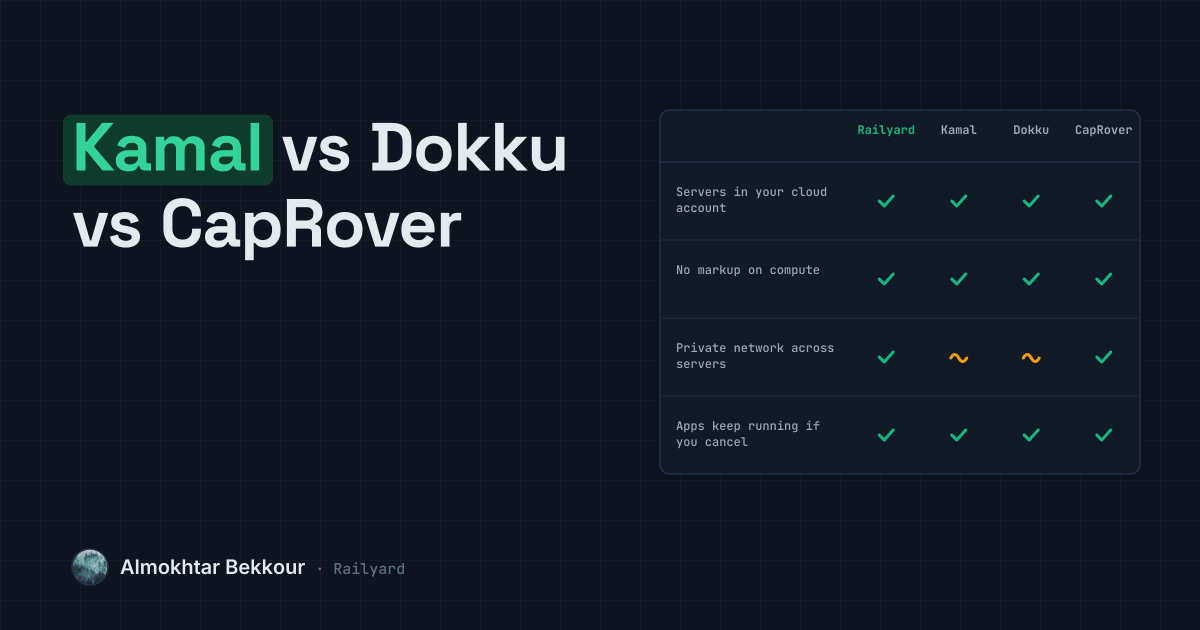
| Servers live in your own cloud accountConnect DigitalOcean, Hetzner, Vultr, OVH or AWS and Railyard provisions and deploys straight onto a server in that account. | yes | yes | yes | yes |
| No markup on computeYou pay your cloud provider directly, at their price. Railyard's fee is a flat amount per team, not a cut of your server bill. | yes | yes | yes | yes |
| Bring any Ubuntu server over SSHPoint Railyard at an existing server's host, a user and an SSH key, and it connects and takes over from there. | yes | yes | yes | yes |
| Deploy from GitHub on every pushConnect a repository once; every push to the branch you choose builds, releases and swaps traffic automatically. | yes | no | partial | partial |
| Preview environment per pull requestEach pull request gets its own copy with its own URL and a comment on the PR, torn down automatically when it closes. | yes | no | no | no |
| Managed databases with scheduled backupsPostgres, MySQL, Redis and more are provisioned on your servers, with backups scheduled, verified by a restore, and kept for the window you set. | yes | no | no | no |
| Point-in-time database restoreRestore any database to any minute inside your retention window, into a new database alongside the original. | yes | no | no | no |
| Visual canvas of your projectEvery service, database and the links between them render as a live picture you can edit and deploy from. | yes | no | no | no |
| Private network between servicesEvery server Railyard manages joins a private network automatically, so services talk to each other without touching the public internet. | yes | partial | partial | yes |
| Sleep when idle, wake on requestAn app with no traffic for a while stops its process, then starts it again the moment a request arrives. | yes | no | no | no |
| Plain-language reason when a deploy failsA failed deploy names the cause in plain language — a failed health check, a bad build, a missing variable — and links straight to the fix. | yes | no | no | no |
| Apps keep running if you cancelYour apps are plain containers on servers you own behind a standard proxy. Cancel Railyard and they keep serving traffic; you just lose the dashboard. | yes | yes | yes | yes |
Where Kamal is better
- Kamal is free, open source, and requires no account or vendor at all — you own the entire toolchain.
- It works on literally any Docker host, including a single old laptop turned server, with no minimum setup Kamal itself requires.
- Accessories let you define and run supporting containers, like Redis or a cron container, in the same config file as the app.
- A large, active open-source community backed by 37signals ships frequent releases and plain-text documentation you can read end to end.
Pick Kamal if
Pick Kamal if you're comfortable writing the YAML and running the deploy command yourself, and don't need a dashboard, managed databases or team access control.
Pick Railyard if
Pick Railyard if you want Kamal's bring-your-own-server philosophy without hand-writing the YAML: a dashboard, managed databases with backups, pull request previews and team roles, for a flat $19 a month per team.
Where Dokku is better
- Free and open source, with no vendor account or subscription needed.
- Takes Heroku-compatible apps over git push, so many Heroku apps move over with few changes.
- A plugin system you can extend in any language.
- Dokku Pro is a one-time license with no subscription and no per-seat fees.
Pick Dokku if
Pick Dokku if you run apps on one server you manage yourself and want a free, scriptable tool with no outside dependency.
Pick Railyard if
Pick Railyard if you want a team dashboard, managed databases with verified backups, pull request previews and several servers, without maintaining the tooling yourself.
Where CapRover is better
- Completely free and open source, with no vendor account and no subscription.
- You host the whole thing yourself, dashboard included, so nothing depends on an outside service.
- The Apache 2.0 license lets you read, change and fork the code that runs your apps.
Pick CapRover if
Pick CapRover if you want a free, self-hosted panel you fully control and you're comfortable handling backups, upgrades and recovery yourself.
Pick Railyard if
Pick Railyard if you want managed databases with verified backups and point-in-time restore, pull request previews and a team dashboard, without hosting and maintaining the panel yourself.
Pricing
- Kamal
- Kamal itself is free and open source; you pay only for the servers you point it at, at your cloud provider's own price.
- Dokku
- The open-source edition is free; you only pay for your server. Dokku Pro, an optional web interface with team management, is a one-time $849 license.
- CapRover
- Free and open source under the Apache 2.0 license. You only pay for the servers you run it on.
Sources: Kamal: Kamal · Dokku: Home · Dokku: Dokku Pro · CapRover: Home